
Memberships & Bundles
What if one checkout could sell five of your courses? Or a course and a yoga mat?
That is exactly what Memberships and Bundles in Courses Plus do. You put several courses into one Shopify product, and the customer gets access to all of them with a single purchase.
In short
- One product = several courses, one price
- Set up in a few minutes, no code and no extra apps
- Works for seasonal sales, tiered plans, learning paths, course + product kits and dropshipping stores
See Memberships & Bundles in a quick overview →
In this article
What are memberships and bundles?
A membership or bundle (two names for the same feature) is a Shopify product that includes several of your courses. You set one price for the set, and Courses Plus gives the buyer access to every course inside automatically.
For example, a Yoga challenge bundle could hold four courses: Yoga foundations, 7-day yoga challenge, Blissful Balance and Learn Meditation: Advanced. One product, four courses.
Why it helps you sell more:
- Bigger orders. Several courses in one purchase instead of one.
- A clear deal. A bundle priced below the separate courses gives people a reason to buy now.
- A clear path. The bundle shows which courses belong together.
How it works
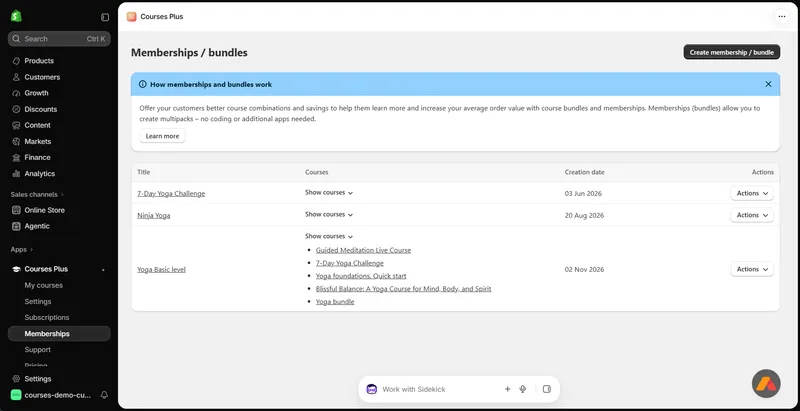
- Open the Memberships tab in Courses Plus and click Create membership / bundle.
- Choose the format: a new Shopify product, or a product you already have.
- Add the name, description and price, pick the courses and save.
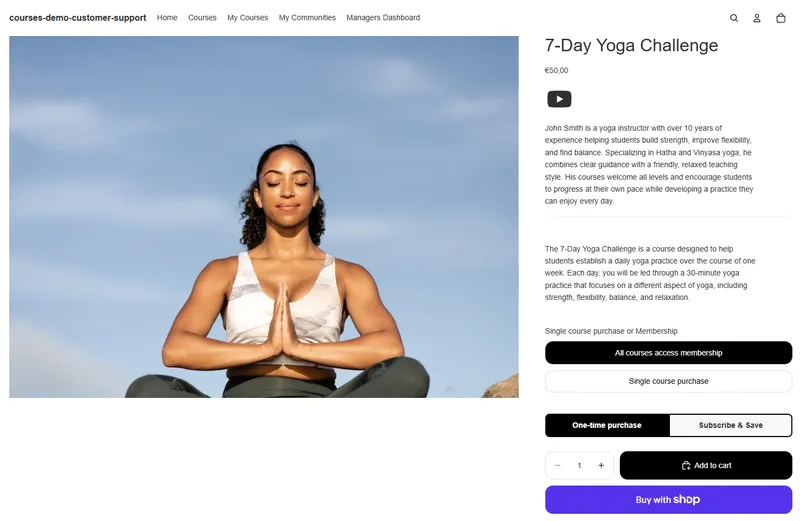
For your customers, a bundle is just a regular product. They open a familiar product page, add it to the cart and check out as usual. No separate platform, no extra steps.
Need the details? The Memberships and bundles guide in our Help Center walks you through the setup step by step, including tag-based access, adding attendees manually and access reports.
5 examples to use bundles
01 · Seasonal
Holiday sales and events
“Black Friday learning pack”: your best sellers in one product.
One offer to put in emails, ads and banners. Hide it when the campaign ends.
02 · Tiers
Bronze, Silver, Gold
Bronze: basics. Silver: + intermediate. Gold: the full program.
Each customer picks a level that fits their goals and budget, and sees what the next tier adds.
03 · Programs
Learning paths
“Zero to conversational”: A1, A2 and B1 language levels.
Students see the whole journey, and you can still sell each course on its own.
04 · Kits
Course + physical product
A yoga mat + a beginner yoga course.
With the free Shopify Bundles app, you ship the product and Courses Plus grants course access automatically.
05 · Dropshipping
Product + “how to use it” course
A gadget + a short course on getting the most out of it.
More trust, fewer support questions, and a reason to buy from you. More below ↓
More course + product ideas: a baking kit + a masterclass, a camera + a photography course, a skincare set + a routine course, an instrument + beginner lessons.
Spotlight: bundles for dropshipping stores
Selling a product that needs a bit of explanation, like a gadget, a fitness tool, a beauty device or a hobby kit? Create a short course about it in Courses Plus and sell the two together. The course shows that a real store stands behind the product, answers questions before they reach your inbox and sets you apart from stores that sell the same item.
It all starts with a product people actually want. Tools like Sell The Trend use AI and market data to help merchants research products, analyze competitors and find suppliers. Once you have found a product that sells, a course that helps customers get the most out of it is a natural next step.
Already run a dropshipping store? Your experience is a course in itself. Package it as a “Dropshipping basics” bundle for beginners and a “Scaling” bundle for sellers who already have their first sales.
Tips for bundles that sell
- Show the saving. Say how much the customer saves compared with buying the courses separately.
- Name the outcome. “Bake your first sourdough” sells better than “Courses 1–4”.
- Keep it focused. One goal or one audience per bundle.
- Check the storefront. Look at the product page, the cart and the My courses page after purchase.
Ready to build your first bundle?
Setup takes a few minutes, and your customers shop the way they always do on Shopify.
Frequently asked questions
Is a membership the same as a bundle in Courses Plus?
Yes. It is one feature: a Shopify product that includes several courses and gives access to all of them after purchase.
Can I add physical products to a course bundle?
Yes. Use the free Shopify Bundles app to create a bundle product with your course and the physical items. You ship the products, and Courses Plus grants course access automatically.
Can I sell a bundle as a subscription?
Yes. Memberships and bundles are compatible with Courses Plus subscriptions.
Can I still sell each course separately?
Yes. A course can be sold on its own and be part of one or more bundles.
Where can I find step-by-step instructions?
In the Memberships and bundles guide in the Courses Plus Help Center.